> ## Documentation Index
> Fetch the complete documentation index at: https://dimensionalos.mintlify.site/llms.txt
> Use this file to discover all available pages before exploring further.
# Transforms
## The Problem: Everything Measures from Its Own Perspective
Imagine your robot has an RGB-D camera-a camera that captures both color images and depth (distance to each pixel). These are common in robotics: Intel RealSense, Microsoft Kinect, and similar sensors.
The camera spots a coffee mug at pixel (320, 240), and the depth sensor says it's 1.2 meters away. You want the robot arm to pick it up-but the arm doesn't understand pixels or camera-relative distances. It needs coordinates in its own workspace: "move to position (0.8, 0.3, 0.1) meters from my base."
To convert camera measurements to arm coordinates, you need to know:
* The camera's intrinsic parameters (focal length, sensor size) to convert pixels to a 3D direction
* The depth value to get the full 3D position relative to the camera
* Where the camera is mounted relative to the arm, and at what angle
This chain of conversions-(pixels + depth) → 3D point in camera frame → robot coordinates-is what **transforms** handle.
diagram source
```pikchr fold output=assets/transforms_tree.svg theme={null}
color = white
fill = none
# Root (left side)
W: box "world" rad 5px fit wid 170% ht 170%
arrow right 0.4in
RB: box "robot_base" rad 5px fit wid 170% ht 170%
# Camera branch (top)
arrow from RB.e right 0.3in then up 0.4in then right 0.3in
CL: box "camera_link" rad 5px fit wid 170% ht 170%
arrow right 0.4in
CO: box "camera_optical" rad 5px fit wid 170% ht 170%
text "mug here" small italic at (CO.s.x, CO.s.y - 0.25in)
# Arm branch (bottom)
arrow from RB.e right 0.3in then down 0.4in then right 0.3in
AB: box "arm_base" rad 5px fit wid 170% ht 170%
arrow right 0.4in
GR: box "gripper" rad 5px fit wid 170% ht 170%
text "target here" small italic at (GR.s.x, GR.s.y - 0.25in)
```
 Each arrow in this tree is a transform. To get the mug's position in gripper coordinates, you chain transforms through their common parent: camera → robot\_base → arm → gripper.
## What's a Coordinate Frame?
A **coordinate frame** is simply a point of view-an origin point and a set of axes (X, Y, Z) from which you measure positions and orientations.
Think of it like giving directions:
* **GPS** says you're at 37.7749° N, 122.4194° W
* The **coffee shop floor plan** says "table 5 is 3 meters from the entrance"
* Your **friend** says "I'm two tables to your left"
These all describe positions in the same physical space, but from different reference points. Each is a coordinate frame.
In a robot:
* The **camera** measures in pixels, or in meters relative to its lens
* The **LIDAR** measures distances from its own mounting point
* The **robot arm** thinks in terms of its base or end-effector position
* The **world** has a fixed coordinate system everything lives in
Each sensor, joint, and reference point has its own frame.
## The Transform Class
The `Transform` class at [`geometry_msgs/Transform.py`](/dimos/msgs/geometry_msgs/Transform.py#L21) represents a spatial transformation with:
* `frame_id` - The parent frame name
* `child_frame_id` - The child frame name
* `translation` - A `Vector3` (x, y, z) offset
* `rotation` - A `Quaternion` (x, y, z, w) orientation
* `ts` - Timestamp for temporal lookups
```python theme={null}
from dimos.msgs.geometry_msgs.Quaternion import Quaternion
from dimos.msgs.geometry_msgs.Transform import Transform
from dimos.msgs.geometry_msgs.Vector3 import Vector3
# Camera 0.5m forward and 0.3m up from base, no rotation
camera_transform = Transform(
translation=Vector3(0.5, 0.0, 0.3),
rotation=Quaternion(0.0, 0.0, 0.0, 1.0), # Identity rotation
frame_id="base_link",
child_frame_id="camera_link",
)
print(camera_transform)
```
```results theme={null}
base_link -> camera_link
Translation: → Vector Vector([0.5 0. 0.3])
Rotation: Quaternion(0.000000, 0.000000, 0.000000, 1.000000)
```
### Transform Operations
Transforms can be composed and inverted:
```python theme={null}
from dimos.msgs.geometry_msgs.Quaternion import Quaternion
from dimos.msgs.geometry_msgs.Transform import Transform
from dimos.msgs.geometry_msgs.Vector3 import Vector3
# Create two transforms
t1 = Transform(
translation=Vector3(1.0, 0.0, 0.0),
rotation=Quaternion(0.0, 0.0, 0.0, 1.0),
frame_id="base_link",
child_frame_id="camera_link",
)
t2 = Transform(
translation=Vector3(0.0, 0.5, 0.0),
rotation=Quaternion(0.0, 0.0, 0.0, 1.0),
frame_id="camera_link",
child_frame_id="end_effector",
)
# Compose: base_link -> camera -> end_effector
t3 = t1 + t2
print(f"Composed: {t3.frame_id} -> {t3.child_frame_id}")
print(f"Translation: ({t3.translation.x}, {t3.translation.y}, {t3.translation.z})")
# Inverse: if t goes A -> B, -t goes B -> A
t_inverse = -t1
print(f"Inverse: {t_inverse.frame_id} -> {t_inverse.child_frame_id}")
```
```results theme={null}
Composed: base_link -> end_effector
Translation: (1.0, 0.5, 0.0)
Inverse: camera_link -> base_link
```
### Converting to Matrix Form
For integration with libraries like NumPy or OpenCV:
```python theme={null}
from dimos.msgs.geometry_msgs.Quaternion import Quaternion
from dimos.msgs.geometry_msgs.Transform import Transform
from dimos.msgs.geometry_msgs.Vector3 import Vector3
t = Transform(
translation=Vector3(1.0, 2.0, 3.0),
rotation=Quaternion(0.0, 0.0, 0.0, 1.0),
)
matrix = t.to_matrix()
print("4x4 transformation matrix:")
print(matrix)
```
```results theme={null}
4x4 transformation matrix:
[[1. 0. 0. 1.]
[0. 1. 0. 2.]
[0. 0. 1. 3.]
[0. 0. 0. 1.]]
```
## Frame IDs in Modules
Modules in DimOS automatically get a `frame_id` property. This is controlled by two config options in [`core/module.py`](/dimos/core/module.py#L78):
* `frame_id` - The base frame name (defaults to the class name)
* `frame_id_prefix` - Optional prefix for namespacing
```python theme={null}
from dimos.core.module import Module, ModuleConfig
class MyModuleConfig(ModuleConfig):
frame_id: str = "sensor_link"
frame_id_prefix: str | None = None
class MySensorModule(Module):
config: MyModuleConfig
# With default config:
sensor = MySensorModule()
print(f"Default frame_id: {sensor.frame_id}")
# With prefix (useful for multi-robot scenarios):
sensor2 = MySensorModule(frame_id_prefix="robot1")
print(f"With prefix: {sensor2.frame_id}")
```
```results theme={null}
Default frame_id: sensor_link
With prefix: robot1/sensor_link
```
## The TF Service
Every module has access to `self.tf`, a transform service that:
* **Publishes** transforms to the system
* **Looks up** transforms between any two frames
* **Buffers** historical transforms for temporal queries
The TF service is implemented in [`protocol/tf/tf.py`](/dimos/protocol/tf/tf.py) and is lazily initialized on first access.
### Multi-Module Transform Example
This example demonstrates how multiple modules publish and receive transforms. Three modules work together:
1. **RobotBaseModule** - Publishes `world -> base_link` (robot's position in the world)
2. **CameraModule** - Publishes `base_link -> camera_link` (camera mounting position) and `camera_link -> camera_optical` (optical frame convention)
3. **PerceptionModule** - Looks up transforms between any frames
```python skip ansi=false theme={null}
import time
import reactivex as rx
from reactivex import operators as ops
from dimos.core.core import rpc
from dimos.core.module import Module
from dimos.msgs.geometry_msgs.Quaternion import Quaternion
from dimos.msgs.geometry_msgs.Transform import Transform
from dimos.msgs.geometry_msgs.Vector3 import Vector3
from dimos.core.coordination.module_coordinator import ModuleCoordinator
class RobotBaseModule(Module):
"""Publishes the robot's position in the world frame at 10Hz."""
@rpc
def start(self) -> None:
super().start()
def publish_pose(_):
robot_pose = Transform(
translation=Vector3(2.5, 3.0, 0.0),
rotation=Quaternion(0.0, 0.0, 0.0, 1.0),
frame_id="world",
child_frame_id="base_link",
ts=time.time(),
)
self.tf.publish(robot_pose)
self.register_disposable(
rx.interval(0.1).subscribe(publish_pose)
)
class CameraModule(Module):
"""Publishes camera transforms at 10Hz."""
@rpc
def start(self) -> None:
super().start()
def publish_transforms(_):
camera_mount = Transform(
translation=Vector3(1.0, 0.0, 0.3),
rotation=Quaternion(0.0, 0.0, 0.0, 1.0),
frame_id="base_link",
child_frame_id="camera_link",
ts=time.time(),
)
optical_frame = Transform(
translation=Vector3(0.0, 0.0, 0.0),
rotation=Quaternion(-0.5, 0.5, -0.5, 0.5),
frame_id="camera_link",
child_frame_id="camera_optical",
ts=time.time(),
)
self.tf.publish(camera_mount, optical_frame)
self.register_disposable(
rx.interval(0.1).subscribe(publish_transforms)
)
class PerceptionModule(Module):
"""Receives transforms and performs lookups."""
@rpc
def start(self) -> None:
super().start()
# This is just to init the transforms system.
# Touching the property for the first time enables the system for this module.
# Transform lookups normally happen in fast loops in IRL modules.
_ = self.tf
@rpc
def lookup(self) -> None:
# Will pretty-print information on transforms in the buffer
print(self.tf)
direct = self.tf.get("world", "base_link")
print(f"Direct: robot is at ({direct.translation.x}, {direct.translation.y})m in world\n")
# Chained lookup - automatically composes world -> base -> camera -> optical
chained = self.tf.get("world", "camera_optical")
print(f"Chained: {chained}\n")
# Inverse lookup - automatically inverts direction
inverse = self.tf.get("camera_optical", "world")
print(f"Inverse: {inverse}\n")
print("Transform tree:")
print(self.tf.graph())
if __name__ == "__main__":
dimos = ModuleCoordinator()
dimos.start()
robot = dimos.deploy(RobotBaseModule)
camera = dimos.deploy(CameraModule)
perception = dimos.deploy(PerceptionModule)
dimos.start_all_modules()
# Give worker TF publishers a moment to populate the buffer before querying.
time.sleep(2.5)
perception.lookup()
dimos.stop()
```
```results theme={null}
16:21:45.203 [inf][ation/worker_manager_python.py] Worker pool started. n_workers=2
16:21:45.445 [inf][/coordination/python_worker.py] Deployed module. module=RobotBaseModule module_id=0 worker_id=0
16:21:45.451 [inf][/coordination/python_worker.py] Deployed module. module=CameraModule module_id=1 worker_id=1
16:21:45.452 [inf][/coordination/python_worker.py] Deployed module. module=PerceptionModule module_id=2 worker_id=0
16:21:47.968 [inf][dination/module_coordinator.py] Stopping module... module=PerceptionModule
16:21:48.022 [inf][dination/module_coordinator.py] Module stopped. module=PerceptionModule
16:21:48.022 [inf][dination/module_coordinator.py] Stopping module... module=CameraModule
16:21:48.041 [inf][dination/module_coordinator.py] Module stopped. module=CameraModule
16:21:48.041 [inf][dination/module_coordinator.py] Stopping module... module=RobotBaseModule
16:21:48.062 [inf][dination/module_coordinator.py] Module stopped. module=RobotBaseModule
16:21:48.062 [inf][ation/worker_manager_python.py] Shutting down all workers...
16:21:48.062 [inf][/coordination/python_worker.py] Worker stopping module... module=CameraModule module_id=1 worker_id=1
16:21:48.063 [inf][/coordination/python_worker.py] Worker module stopped. module=CameraModule module_id=1 worker_id=1
LCMTF(3 buffers):
TBuffer(base_link -> camera_link, 24 msgs, 2.37s [2026-04-21 01:21:45 - 2026-04-21 01:21:47])
TBuffer(camera_link -> camera_optical, 24 msgs, 2.37s [2026-04-21 01:21:45 - 2026-04-21 01:21:47])
TBuffer(world -> base_link, 24 msgs, 2.37s [2026-04-21 01:21:45 - 2026-04-21 01:21:47])
Direct: robot is at (2.5, 3.0)m in world
Chained: world -> camera_optical
Translation: → Vector Vector([3.5 3. 0.3])
Rotation: Quaternion(-0.500000, 0.500000, -0.500000, 0.500000)
Inverse: camera_optical -> world
Translation: → Vector Vector([ 3. 0.3 -3.5])
Rotation: Quaternion(0.500000, -0.500000, 0.500000, 0.500000)
Transform tree:
┌─────┐
│world│
└┬────┘
┌▽────────┐
│base_link│
└┬────────┘
┌▽──────────┐
│camera_link│
└┬──────────┘
┌▽─────────────┐
│camera_optical│
└──────────────┘
```
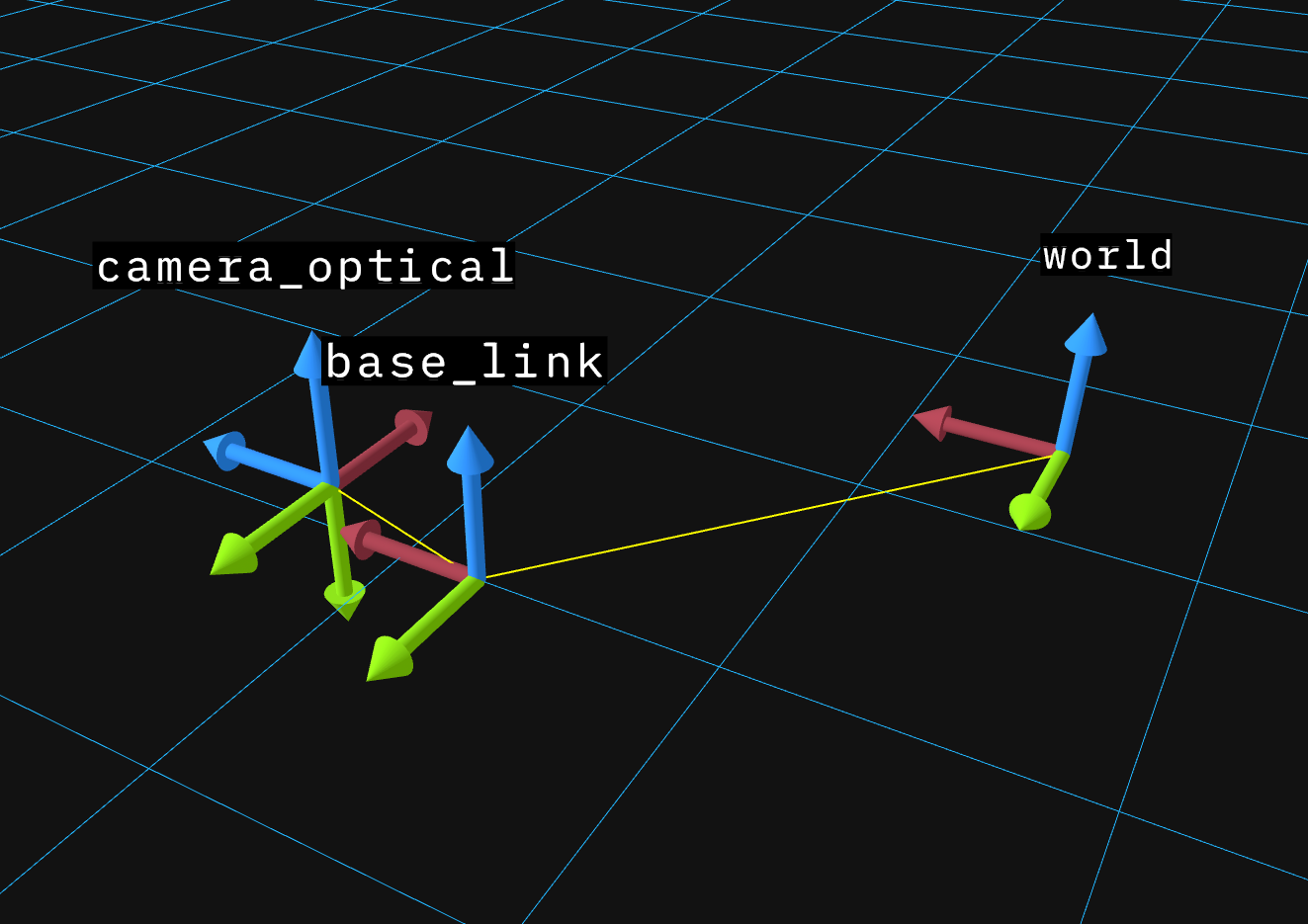
You can view these transforms in 3D using the Rerun viewer (see [Visualization](/usage/visualization)).
Each arrow in this tree is a transform. To get the mug's position in gripper coordinates, you chain transforms through their common parent: camera → robot\_base → arm → gripper.
## What's a Coordinate Frame?
A **coordinate frame** is simply a point of view-an origin point and a set of axes (X, Y, Z) from which you measure positions and orientations.
Think of it like giving directions:
* **GPS** says you're at 37.7749° N, 122.4194° W
* The **coffee shop floor plan** says "table 5 is 3 meters from the entrance"
* Your **friend** says "I'm two tables to your left"
These all describe positions in the same physical space, but from different reference points. Each is a coordinate frame.
In a robot:
* The **camera** measures in pixels, or in meters relative to its lens
* The **LIDAR** measures distances from its own mounting point
* The **robot arm** thinks in terms of its base or end-effector position
* The **world** has a fixed coordinate system everything lives in
Each sensor, joint, and reference point has its own frame.
## The Transform Class
The `Transform` class at [`geometry_msgs/Transform.py`](/dimos/msgs/geometry_msgs/Transform.py#L21) represents a spatial transformation with:
* `frame_id` - The parent frame name
* `child_frame_id` - The child frame name
* `translation` - A `Vector3` (x, y, z) offset
* `rotation` - A `Quaternion` (x, y, z, w) orientation
* `ts` - Timestamp for temporal lookups
```python theme={null}
from dimos.msgs.geometry_msgs.Quaternion import Quaternion
from dimos.msgs.geometry_msgs.Transform import Transform
from dimos.msgs.geometry_msgs.Vector3 import Vector3
# Camera 0.5m forward and 0.3m up from base, no rotation
camera_transform = Transform(
translation=Vector3(0.5, 0.0, 0.3),
rotation=Quaternion(0.0, 0.0, 0.0, 1.0), # Identity rotation
frame_id="base_link",
child_frame_id="camera_link",
)
print(camera_transform)
```
```results theme={null}
base_link -> camera_link
Translation: → Vector Vector([0.5 0. 0.3])
Rotation: Quaternion(0.000000, 0.000000, 0.000000, 1.000000)
```
### Transform Operations
Transforms can be composed and inverted:
```python theme={null}
from dimos.msgs.geometry_msgs.Quaternion import Quaternion
from dimos.msgs.geometry_msgs.Transform import Transform
from dimos.msgs.geometry_msgs.Vector3 import Vector3
# Create two transforms
t1 = Transform(
translation=Vector3(1.0, 0.0, 0.0),
rotation=Quaternion(0.0, 0.0, 0.0, 1.0),
frame_id="base_link",
child_frame_id="camera_link",
)
t2 = Transform(
translation=Vector3(0.0, 0.5, 0.0),
rotation=Quaternion(0.0, 0.0, 0.0, 1.0),
frame_id="camera_link",
child_frame_id="end_effector",
)
# Compose: base_link -> camera -> end_effector
t3 = t1 + t2
print(f"Composed: {t3.frame_id} -> {t3.child_frame_id}")
print(f"Translation: ({t3.translation.x}, {t3.translation.y}, {t3.translation.z})")
# Inverse: if t goes A -> B, -t goes B -> A
t_inverse = -t1
print(f"Inverse: {t_inverse.frame_id} -> {t_inverse.child_frame_id}")
```
```results theme={null}
Composed: base_link -> end_effector
Translation: (1.0, 0.5, 0.0)
Inverse: camera_link -> base_link
```
### Converting to Matrix Form
For integration with libraries like NumPy or OpenCV:
```python theme={null}
from dimos.msgs.geometry_msgs.Quaternion import Quaternion
from dimos.msgs.geometry_msgs.Transform import Transform
from dimos.msgs.geometry_msgs.Vector3 import Vector3
t = Transform(
translation=Vector3(1.0, 2.0, 3.0),
rotation=Quaternion(0.0, 0.0, 0.0, 1.0),
)
matrix = t.to_matrix()
print("4x4 transformation matrix:")
print(matrix)
```
```results theme={null}
4x4 transformation matrix:
[[1. 0. 0. 1.]
[0. 1. 0. 2.]
[0. 0. 1. 3.]
[0. 0. 0. 1.]]
```
## Frame IDs in Modules
Modules in DimOS automatically get a `frame_id` property. This is controlled by two config options in [`core/module.py`](/dimos/core/module.py#L78):
* `frame_id` - The base frame name (defaults to the class name)
* `frame_id_prefix` - Optional prefix for namespacing
```python theme={null}
from dimos.core.module import Module, ModuleConfig
class MyModuleConfig(ModuleConfig):
frame_id: str = "sensor_link"
frame_id_prefix: str | None = None
class MySensorModule(Module):
config: MyModuleConfig
# With default config:
sensor = MySensorModule()
print(f"Default frame_id: {sensor.frame_id}")
# With prefix (useful for multi-robot scenarios):
sensor2 = MySensorModule(frame_id_prefix="robot1")
print(f"With prefix: {sensor2.frame_id}")
```
```results theme={null}
Default frame_id: sensor_link
With prefix: robot1/sensor_link
```
## The TF Service
Every module has access to `self.tf`, a transform service that:
* **Publishes** transforms to the system
* **Looks up** transforms between any two frames
* **Buffers** historical transforms for temporal queries
The TF service is implemented in [`protocol/tf/tf.py`](/dimos/protocol/tf/tf.py) and is lazily initialized on first access.
### Multi-Module Transform Example
This example demonstrates how multiple modules publish and receive transforms. Three modules work together:
1. **RobotBaseModule** - Publishes `world -> base_link` (robot's position in the world)
2. **CameraModule** - Publishes `base_link -> camera_link` (camera mounting position) and `camera_link -> camera_optical` (optical frame convention)
3. **PerceptionModule** - Looks up transforms between any frames
```python skip ansi=false theme={null}
import time
import reactivex as rx
from reactivex import operators as ops
from dimos.core.core import rpc
from dimos.core.module import Module
from dimos.msgs.geometry_msgs.Quaternion import Quaternion
from dimos.msgs.geometry_msgs.Transform import Transform
from dimos.msgs.geometry_msgs.Vector3 import Vector3
from dimos.core.coordination.module_coordinator import ModuleCoordinator
class RobotBaseModule(Module):
"""Publishes the robot's position in the world frame at 10Hz."""
@rpc
def start(self) -> None:
super().start()
def publish_pose(_):
robot_pose = Transform(
translation=Vector3(2.5, 3.0, 0.0),
rotation=Quaternion(0.0, 0.0, 0.0, 1.0),
frame_id="world",
child_frame_id="base_link",
ts=time.time(),
)
self.tf.publish(robot_pose)
self.register_disposable(
rx.interval(0.1).subscribe(publish_pose)
)
class CameraModule(Module):
"""Publishes camera transforms at 10Hz."""
@rpc
def start(self) -> None:
super().start()
def publish_transforms(_):
camera_mount = Transform(
translation=Vector3(1.0, 0.0, 0.3),
rotation=Quaternion(0.0, 0.0, 0.0, 1.0),
frame_id="base_link",
child_frame_id="camera_link",
ts=time.time(),
)
optical_frame = Transform(
translation=Vector3(0.0, 0.0, 0.0),
rotation=Quaternion(-0.5, 0.5, -0.5, 0.5),
frame_id="camera_link",
child_frame_id="camera_optical",
ts=time.time(),
)
self.tf.publish(camera_mount, optical_frame)
self.register_disposable(
rx.interval(0.1).subscribe(publish_transforms)
)
class PerceptionModule(Module):
"""Receives transforms and performs lookups."""
@rpc
def start(self) -> None:
super().start()
# This is just to init the transforms system.
# Touching the property for the first time enables the system for this module.
# Transform lookups normally happen in fast loops in IRL modules.
_ = self.tf
@rpc
def lookup(self) -> None:
# Will pretty-print information on transforms in the buffer
print(self.tf)
direct = self.tf.get("world", "base_link")
print(f"Direct: robot is at ({direct.translation.x}, {direct.translation.y})m in world\n")
# Chained lookup - automatically composes world -> base -> camera -> optical
chained = self.tf.get("world", "camera_optical")
print(f"Chained: {chained}\n")
# Inverse lookup - automatically inverts direction
inverse = self.tf.get("camera_optical", "world")
print(f"Inverse: {inverse}\n")
print("Transform tree:")
print(self.tf.graph())
if __name__ == "__main__":
dimos = ModuleCoordinator()
dimos.start()
robot = dimos.deploy(RobotBaseModule)
camera = dimos.deploy(CameraModule)
perception = dimos.deploy(PerceptionModule)
dimos.start_all_modules()
# Give worker TF publishers a moment to populate the buffer before querying.
time.sleep(2.5)
perception.lookup()
dimos.stop()
```
```results theme={null}
16:21:45.203 [inf][ation/worker_manager_python.py] Worker pool started. n_workers=2
16:21:45.445 [inf][/coordination/python_worker.py] Deployed module. module=RobotBaseModule module_id=0 worker_id=0
16:21:45.451 [inf][/coordination/python_worker.py] Deployed module. module=CameraModule module_id=1 worker_id=1
16:21:45.452 [inf][/coordination/python_worker.py] Deployed module. module=PerceptionModule module_id=2 worker_id=0
16:21:47.968 [inf][dination/module_coordinator.py] Stopping module... module=PerceptionModule
16:21:48.022 [inf][dination/module_coordinator.py] Module stopped. module=PerceptionModule
16:21:48.022 [inf][dination/module_coordinator.py] Stopping module... module=CameraModule
16:21:48.041 [inf][dination/module_coordinator.py] Module stopped. module=CameraModule
16:21:48.041 [inf][dination/module_coordinator.py] Stopping module... module=RobotBaseModule
16:21:48.062 [inf][dination/module_coordinator.py] Module stopped. module=RobotBaseModule
16:21:48.062 [inf][ation/worker_manager_python.py] Shutting down all workers...
16:21:48.062 [inf][/coordination/python_worker.py] Worker stopping module... module=CameraModule module_id=1 worker_id=1
16:21:48.063 [inf][/coordination/python_worker.py] Worker module stopped. module=CameraModule module_id=1 worker_id=1
LCMTF(3 buffers):
TBuffer(base_link -> camera_link, 24 msgs, 2.37s [2026-04-21 01:21:45 - 2026-04-21 01:21:47])
TBuffer(camera_link -> camera_optical, 24 msgs, 2.37s [2026-04-21 01:21:45 - 2026-04-21 01:21:47])
TBuffer(world -> base_link, 24 msgs, 2.37s [2026-04-21 01:21:45 - 2026-04-21 01:21:47])
Direct: robot is at (2.5, 3.0)m in world
Chained: world -> camera_optical
Translation: → Vector Vector([3.5 3. 0.3])
Rotation: Quaternion(-0.500000, 0.500000, -0.500000, 0.500000)
Inverse: camera_optical -> world
Translation: → Vector Vector([ 3. 0.3 -3.5])
Rotation: Quaternion(0.500000, -0.500000, 0.500000, 0.500000)
Transform tree:
┌─────┐
│world│
└┬────┘
┌▽────────┐
│base_link│
└┬────────┘
┌▽──────────┐
│camera_link│
└┬──────────┘
┌▽─────────────┐
│camera_optical│
└──────────────┘
```
You can view these transforms in 3D using the Rerun viewer (see [Visualization](/usage/visualization)).
 Key points:
* **Automatic broadcasting**: `self.tf.publish()` broadcasts via LCM to all modules
* **Chained lookups**: TF finds paths through the tree automatically
* **Inverse lookups**: Request transforms in either direction
* **Temporal buffering**: Transforms are timestamped and buffered (default 10s) for sensor fusion
The transform tree from the example above, showing which module publishes each transform:
Key points:
* **Automatic broadcasting**: `self.tf.publish()` broadcasts via LCM to all modules
* **Chained lookups**: TF finds paths through the tree automatically
* **Inverse lookups**: Request transforms in either direction
* **Temporal buffering**: Transforms are timestamped and buffered (default 10s) for sensor fusion
The transform tree from the example above, showing which module publishes each transform:
diagram source
```pikchr fold output=assets/transforms_modules.svg theme={null}
color = white
fill = none
# Frame boxes
W: box "world" rad 5px fit wid 170% ht 170%
A1: arrow right 0.4in
BL: box "base_link" rad 5px fit wid 170% ht 170%
A2: arrow right 0.4in
CL: box "camera_link" rad 5px fit wid 170% ht 170%
A3: arrow right 0.4in
CO: box "camera_optical" rad 5px fit wid 170% ht 170%
# RobotBaseModule box - encompasses world->base_link
box width (BL.e.x - W.w.x + 0.15in) height 0.7in \
at ((W.w.x + BL.e.x)/2, W.y - 0.05in) \
rad 10px color 0x6699cc fill none
text "RobotBaseModule" italic at ((W.x + BL.x)/2, W.n.y + 0.25in)
# CameraModule box - encompasses camera_link->camera_optical (starts after base_link)
box width (CO.e.x - BL.e.x + 0.1in) height 0.7in \
at ((BL.e.x + CO.e.x)/2, CL.y + 0.05in) \
rad 10px color 0xcc9966 fill none
text "CameraModule" italic at ((CL.x + CO.x)/2, CL.s.y - 0.25in)
```
 # Internals
## Transform Buffer
`self.tf` on a module is a transform buffer. This is a standalone class that maintains a temporal buffer of transforms (default 10 seconds) allowing queries at past timestamps, you can use it directly:
```python theme={null}
import time
from dimos.msgs.geometry_msgs.Quaternion import Quaternion
from dimos.msgs.geometry_msgs.Transform import Transform
from dimos.msgs.geometry_msgs.Vector3 import Vector3
from dimos.protocol.tf.tf import MultiTBuffer
tf = MultiTBuffer()
# Simulate transforms at different times
for i in range(5):
t = Transform(
translation=Vector3(float(i), 0.0, 0.0),
rotation=Quaternion(0.0, 0.0, 0.0, 1.0),
frame_id="base_link",
child_frame_id="camera_link",
ts=time.time() + i * 0.1,
)
tf.receive_transform(t)
# Query the latest transform
result = tf.get("base_link", "camera_link")
print(f"Latest transform: x={result.translation.x}")
print(f"Buffer has {len(tf.buffers)} transform pair(s)")
print(tf)
```
```results theme={null}
Latest transform: x=4.0
Buffer has 1 transform pair(s)
MultiTBuffer(1 buffers):
TBuffer(base_link -> camera_link, 5 msgs, 0.40s [2026-05-15 21:11:37 - 2026-05-15 21:11:37])
```
This is essential for sensor fusion where you need to know where the camera was when an image was captured, not where it is now.
## Further Reading
For a visual introduction to transforms and coordinate frames:
* [Coordinate Transforms (YouTube)](https://www.youtube.com/watch?v=NGPn9nvLPmg)
For the mathematical foundations, the ROS documentation provides detailed background:
* [ROS tf2 Concepts](http://wiki.ros.org/tf2)
* [ROS REP 103 - Standard Units and Coordinate Conventions](https://www.ros.org/reps/rep-0103.html)
* [ROS REP 105 - Coordinate Frames for Mobile Platforms](https://www.ros.org/reps/rep-0105.html)
See also:
* [Modules](/usage/modules) for understanding the module system
* [Configuration](/usage/configuration) for module configuration patterns
# Internals
## Transform Buffer
`self.tf` on a module is a transform buffer. This is a standalone class that maintains a temporal buffer of transforms (default 10 seconds) allowing queries at past timestamps, you can use it directly:
```python theme={null}
import time
from dimos.msgs.geometry_msgs.Quaternion import Quaternion
from dimos.msgs.geometry_msgs.Transform import Transform
from dimos.msgs.geometry_msgs.Vector3 import Vector3
from dimos.protocol.tf.tf import MultiTBuffer
tf = MultiTBuffer()
# Simulate transforms at different times
for i in range(5):
t = Transform(
translation=Vector3(float(i), 0.0, 0.0),
rotation=Quaternion(0.0, 0.0, 0.0, 1.0),
frame_id="base_link",
child_frame_id="camera_link",
ts=time.time() + i * 0.1,
)
tf.receive_transform(t)
# Query the latest transform
result = tf.get("base_link", "camera_link")
print(f"Latest transform: x={result.translation.x}")
print(f"Buffer has {len(tf.buffers)} transform pair(s)")
print(tf)
```
```results theme={null}
Latest transform: x=4.0
Buffer has 1 transform pair(s)
MultiTBuffer(1 buffers):
TBuffer(base_link -> camera_link, 5 msgs, 0.40s [2026-05-15 21:11:37 - 2026-05-15 21:11:37])
```
This is essential for sensor fusion where you need to know where the camera was when an image was captured, not where it is now.
## Further Reading
For a visual introduction to transforms and coordinate frames:
* [Coordinate Transforms (YouTube)](https://www.youtube.com/watch?v=NGPn9nvLPmg)
For the mathematical foundations, the ROS documentation provides detailed background:
* [ROS tf2 Concepts](http://wiki.ros.org/tf2)
* [ROS REP 103 - Standard Units and Coordinate Conventions](https://www.ros.org/reps/rep-0103.html)
* [ROS REP 105 - Coordinate Frames for Mobile Platforms](https://www.ros.org/reps/rep-0105.html)
See also:
* [Modules](/usage/modules) for understanding the module system
* [Configuration](/usage/configuration) for module configuration patterns